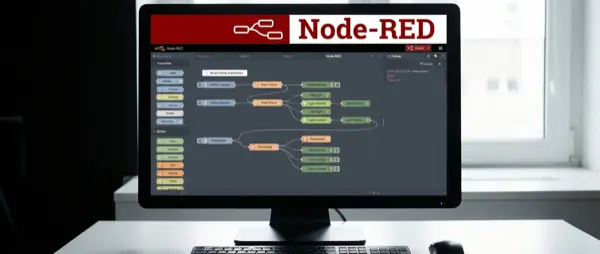
Node-RED is a visual programming tool that turns complex smart home automations into simple drag-and-drop flows. If you want automations beyond what Home Assistant's YAML/UI offers, Node-RED gives you the power of a programmer without writing code. In this guide, we explain what it is, how to install it, and give you 10 practical flow examples.
📖 Read more: Home Assistant vs Google Home: Comparison 2026
What Is Node-RED
Node-RED is an open-source visual programming tool originally built by IBM. It works through your browser — you open a web page, drag “nodes” onto a canvas, connect them together, and create “flows” (automation sequences).
Each node performs one function: receive an MQTT message, check a condition, send a command, call an API, or transform data. The real power lies in how you connect them — a single flow can include 5-50 nodes working together seamlessly to create complex behavior from simple building blocks.
Installation
Home Assistant (Recommended)
- Settings → Add-ons → Add-on Store → Search “Node-RED”
- Install → Configuration → Set credential_secret
- Start → Open Web UI (port 1880)
Standalone (Docker)
docker run -d -p 1880:1880 --name node-red nodered/node-red
Raspberry Pi
For a dedicated Node-RED server on Raspberry Pi, use the official installer script:
bash <(curl -sL https://raw.githubusercontent.com/node-red/linux-installers/master/deb/update-nodejs-and-nodered)
📖 Read more: Smart Home Dashboard: Build Your Own
Core Nodes
| Node | What It Does | Example |
|---|---|---|
| mqtt in | Receives MQTT messages | Temperature sensor reading |
| mqtt out | Sends MQTT messages | Turn on a light |
| switch | Routes based on condition | If temperature > 25°C |
| function | Runs JavaScript code | Calculations, conversions |
| change | Modifies payload values | Set/Move/Delete properties |
| delay | Adds time delay | Wait 5 min before turning off |
| inject | Time-based trigger | Every morning at 7:00 AM |
| debug | Displays data in sidebar | Debugging flow output |
| HA entity | Home Assistant entity | Switch/sensor state |
| HA call service | Calls HA service | Turn on light, turn off AC |
10 Practical Flows
1. Auto Light with Delay
Motion sensor → switch (if ON) → call service (turn on light) → delay (5 min) → call service (turn off light). Ideal for hallways or bathrooms — no more manual light switching needed.
2. Flood Alert
Water sensor → switch (if wet) → notification (Telegram/mobile push). Critical flow for kitchens, bathrooms, or basements. The alert arrives within seconds.
3. Temperature → Air Conditioning
Temperature sensor → switch (if > 27°C) → call service (activate AC at 24°C). Add a second switch for off: if < 23°C → deactivate AC automatically.
4. Morning Routine
Inject (7:00 AM) → call service (lights on 30%) → delay (15 min) → call service (lights 100%) → TTS announce (today's weather). Wake up gradually without sudden bright lights.
5. Auto Garage Close
Garage sensor → switch (if open > 30 min) → call service (close garage) → notification. Never leave the garage door open overnight again.
6. Adaptive Lighting
Inject (every 15 min) → function (calculate color temp based on time of day) → call service (change lighting). Warm light in the evening, cool white during the day, all automatically.
7. Washing Machine Alert
Power sensor → switch (if watts < 5 for 5 min after > 100) → TTS announce (washing machine done). Uses a smart plug with power consumption measurement.
8. Vacancy Mode
Inject (random evening hours) → random node → call service (toggle lights randomly). Simulates presence at home while you're away on vacation.
📖 Read more: Smart Home Motion Sensors: Complete Guide 2026
9. Energy Dashboard
MQTT sensors → function (consumption aggregation) → dashboard chart nodes. See real-time energy graphs directly in the Node-RED dashboard interface.
10. Multi-condition Alarm
Door sensor + time check + presence check → join → switch (if door open + nighttime + nobody home) → alarm trigger + notification. Multiple conditions checked simultaneously for maximum security.
Node-RED vs HA Automations
| Criteria | Node-RED | HA Automations |
|---|---|---|
| Ease of Use | Moderate | Easy (UI) |
| Complexity | ✅ Unlimited | Limited |
| Visual | ✅ Fully visual | Partially |
| Debugging | ✅ Excellent | Basic |
| Performance | Good | ✅ Native |
| Subflows | ✅ Reusable | Scripts/Blueprints |
Tips for Beginners
- Start simple: Build a 3-4 node flow first before attempting complex multi-condition scenarios
- Debug everywhere: Add debug nodes after every node to see what data is passing through in the sidebar
- Backup regularly: Export flows to JSON files regularly — Menu → Export → Clipboard → All flows → Download
- Community flows: At flows.nodered.org you'll find thousands of ready-made flows that you can import with copy-paste
- Subflows: Group common patterns into subflows for reuse across multiple automation flows
- Context variables: Use flow or global variables to store state between node executions
- Palette manager: Install extra nodes via Manage Palette — there are nodes for Telegram, Spotify, weather and more
Conclusion
Node-RED is the most powerful automation tool for smart homes available today. If Home Assistant's built-in automations aren't enough for your needs, Node-RED gives you unlimited capabilities without writing actual code. Installation takes just 5 minutes as a Home Assistant add-on, and the community offers thousands of ready-made flows at flows.nodered.org. Ideal for power users who want complete control over every aspect of their home through visual programming.