The Nanoleaf Story
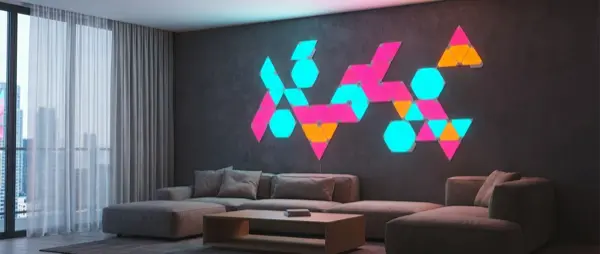
Nanoleaf started in 2012 as a project by three University of Toronto engineers who created “the world's most efficient light bulb” via Kickstarter. The original bulb — a geometric dodecahedron — was interesting but never captured the mass market. The real breakthrough came in 2017 with the Nanoleaf Aurora Light Panels: triangular LED panels that stuck to walls and created stunning geometric designs. The concept was simple but revolutionary — lighting as wall art.
Since then, Nanoleaf has evolved into a full-fledged smart lighting company with annual revenue exceeding $100 million. Their products have become status symbols in gaming, streaming, and content creation spaces — if you watch Twitch streamers or YouTubers, you've almost certainly seen Nanoleaf panels in the background. The company was also a pioneer in adopting the Thread protocol, with their panels functioning as Thread Border Routers — a technical advantage we evaluate below.
Complete Product Lineup 2026
Nanoleaf Shapes: Hexagons, Triangles, Mini Triangles
The Shapes series is Nanoleaf's flagship line. It comes in three form factors: Hexagons, Triangles, and Mini Triangles. The key advantage is that all shapes interconnect — you can mix hexagons with triangles in the same design. Each panel lights up independently with 16 million colors and color temperature from 1200K to 6500K.
The Shapes Hexagon Smarter Kit (7 panels) costs approximately €180-220 and is the ideal starting point. The Shapes Triangle Starter Kit (9 panels) runs €200-240. Expansion Packs (3 panels) cost €55-70, allowing you to gradually extend your layout. Each power supply supports up to 21 Shapes panels or 28 Mini Triangles, while the controller can manage up to 500 panels.
Nanoleaf Lines
The Nanoleaf Lines (€180-200 for 9 bars) take a completely different approach: instead of panels, these are illuminated bars that connect at 60° angles. Each bar has two lighting zones (front and back) that can display different colors, creating a backlit glow effect on the wall. Lines have a more minimalist, “architectural” aesthetic — ideal for living rooms and offices where bright panels might feel excessive.
Nanoleaf Elements
The Nanoleaf Elements (€200-250 for 7 panels) stand out with their faux-wood finish (wood look). Designed for spaces where users want warm, decorative lighting without a “gaming aesthetic,” Elements display only warm white tones — they don't support full RGB colors. This makes them ideal for bedrooms, traditionally decorated living rooms, and relaxation spaces.
Nanoleaf Skylight & Ceiling Lights
New to the lineup for 2025-2026, the Nanoleaf Skylight (€250-300 for 3 panels) are square ceiling panels that replace traditional overhead lighting. Each panel provides functional white light (bright enough for primary room illumination) and full RGBW colors for ambiance. This marks Nanoleaf's first entry into functional lighting — a significant step beyond decorative wall panels.
Nanoleaf Essentials (Bulbs & LED Strips)
The Essentials line includes smart bulbs (E27/GU10, €18-25 per bulb), LED strips (€35-50 for 2m), and light bars. These aren't wall panels — they're more conventional lighting products but with two significant advantages: native Thread/Matter support and excellent color quality. The Essentials A19 bulb outputs 1100 lumens — enough for primary room lighting.
Thread & Matter: The Technical Edge
Nanoleaf was one of the first companies to adopt the Thread protocol — a low-power mesh networking protocol that operates locally without cloud dependency. Most Nanoleaf products function as Thread Border Routers, meaning each panel or bulb automatically strengthens the Thread mesh network in your home. This is particularly valuable if you use other Thread devices (e.g., Eve, IKEA DIRIGERA).
With the upgrade to Matter (available for all new and many existing products), Nanoleaf works natively with Apple HomeKit, Google Home, Samsung SmartThings, Amazon Alexa, and Home Assistant — no bridges or adapters required. This gives Nanoleaf a significant edge over competitors like Govee (which relies on WiFi+Bluetooth without Matter) and even Philips Hue (which requires the Hue Bridge).
Thread Border Router: Why It Matters
Every Nanoleaf panel acts as a Thread Border Router, creating a reliable mesh network. If you have 9 Shapes panels, you have 9 points strengthening your Thread network. This means:
- More reliable connectivity for all Thread devices
- Greater range in large homes
- Less dependency on your WiFi router
- Local control (works even without internet)
The Nanoleaf App
The Nanoleaf app (iOS/Android) offers full control of each panel individually. Key features include: real-time preview (see every panel on your screen), custom scene creation with color movement, Screen Mirror mode (sync with computer display), Rhythm mode (music reactivity via microphone), Schedule & Circadian mode (automatic color temperature changes throughout the day), and Touch Actions (each panel responds to touch).
A standout feature is the Layout Assistant with AR: using your phone's camera, you can preview how panels will look on your wall before mounting them. This is extremely useful for planning large configurations and avoids installation mistakes. The app also includes a community section where users share custom scenes — from Northern Lights gradients and campfire flickers to party strobes and calming meditation patterns.
Nanoleaf vs Govee vs Philips Hue
| Feature | Nanoleaf | Govee | Philips Hue |
|---|---|---|---|
| Wall Panels | Best-in-class (multiple shapes) | Glide Hexa (cheaper) | Not available |
| Starting Price | ~€180 | ~€100 | ~€150 (bridge+bulb) |
| Protocol | Thread/Matter | WiFi+Bluetooth | Zigbee/Matter (via Bridge) |
| Touch Control | Yes | No | No |
| Build Quality | Very Good | Good | Excellent |
| Functional Lighting | Moderate (Skylight good) | Limited | Best-in-class |
| Music Sync | Very Good | Excellent | Limited |
Installation Guide
Step 1: Planning
Before opening the box, download the Nanoleaf app and use the Layout Assistant. Experiment with different designs and use the AR feature to preview how they'll look on your wall. Keep in mind: panels must connect to each other on at least one side — they cannot “float” without a connection to another panel.
Step 2: Wall Preparation
Clean the wall with a mild cleaner or isopropyl alcohol. Ensure the surface is dry, smooth, and dust-free. For painted walls, wait at least 30 days if the wall was recently painted. Nanoleaf's mounting stickers are designed to remove cleanly (similar to Command Strips), but there's risk on delicate surfaces or wallpaper.
Step 3: Mounting
- Attach linker connectors to each panel before mounting on the wall
- Start from the panel closest to the power outlet
- Mount panels one by one, pressing firmly for 30 seconds each
- Attach the controller to any panel
- Connect the power supply to the panel nearest the outlet
- Scan the HomeKit code or use app-based pairing
Strengths & Weaknesses
Why Choose Nanoleaf
- Unique aesthetic: No other product offers wall-mounted light shapes at this quality and variety
- Thread/Matter native: Future-proof, works with every platform without a bridge
- Touch control: Touch a panel to change colors — perfect for kids and party mode
- Modular design: Start with 7 panels, expand gradually up to 500
- Screen Mirror: Projects your screen colors onto the wall in real-time
- Build quality: Excellent stability, durable linkers, reliable adhesives
Points to Consider
- High price: €200+ for a starter kit — significantly more expensive than Govee panels
- Not functional lighting: Wall panels cannot replace primary overhead light (exception: Skylight)
- Power supply required: Needs a nearby outlet — no battery option
- Size: Panels are quite large — may feel overwhelming in small rooms
- EU availability: Best purchased through Amazon.de — limited local retail in Southern Europe
Availability in Europe
Nanoleaf doesn't have dedicated retail partners in all EU countries. The most reliable source remains Amazon.de, which ships to most European countries within 3-7 business days for €5-8 shipping. You may find some models on local comparison sites through third-party sellers, but prices are often 15-25% higher due to import markups. The 2-year EU warranty applies regardless of where within the EU you purchase.
Which Nanoleaf Should You Buy
Quick Recommendations
- Gaming/Streaming setup: Shapes Hexagons Starter Kit (€200) — stunning in YouTube/Twitch backgrounds
- Modern living room: Lines (€180) — elegant, minimalist aesthetic
- Classic/Warm decor: Elements (€220) — wood finish, warm white only
- Primary lighting: Skylight (€280) — replaces ceiling light fixtures
- Budget smart bulbs: Essentials A19 (€20/bulb) — Thread/Matter at IKEA-level pricing
Final Verdict
Nanoleaf occupies a unique position in the smart lighting world: no one else makes decorative wall panels at this level of quality. If you want to transform a wall into something stunning that reacts to music, changes colors with your voice, and works with every smart home platform, Nanoleaf is worth the investment. Thread/Matter support makes them genuinely “future-proof” — they won't fall behind technologically.
The price remains a barrier — a complete setup can cost €300-500 if you want a large design. But Nanoleaf offers something no competitor can match: lighting-as-wall-art, built with excellent quality, and powered by the most modern smart home technology available in February 2026.
Rating: 8.5/10
- Ideal for: Gaming rooms, streaming backgrounds, modern living rooms, wall art lighting
- Not ideal for: Primary lighting (except Skylight), small spaces, strict budgets
- Best buy: Shapes Hexagons Starter Kit — the classic introduction to Nanoleaf