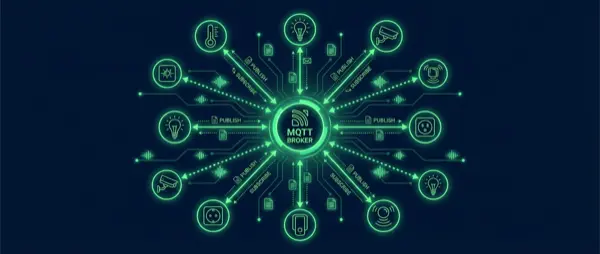
If you get serious about smart home automation, you'll quickly come across the term MQTT. What exactly is it? How does it work? Why is it considered essential in Home Assistant and every advanced automation system? In this guide we explain everything — from basic theory to practical installation — so even beginners can fully understand the MQTT protocol.
What Is MQTT
MQTT (Message Queuing Telemetry Transport) is a lightweight messaging protocol designed for IoT devices. It was created in 1999 by Andy Stanford-Clark (IBM) and Arlen Nipper, originally for monitoring oil pipelines. Today it forms the backbone of smart home automation worldwide.
Unlike HTTP used by most web applications, MQTT is extremely efficient — a message can be as small as 2 bytes. This makes it ideal for microcontrollers (ESP32, ESP8266) and resource-constrained devices running on batteries or limited power.
How It Works: Publish/Subscribe
MQTT is based on the Publish/Subscribe (Pub/Sub) model and consists of three core components:
- Broker: The central server that receives, filters, and distributes messages to all connected clients
- Publisher: The device that publishes (sends) data to a topic
- Subscriber: The device that subscribes (listens) to a topic for incoming data
Example: A temperature sensor publishes 22.5°C to the topic home/bedroom/temperature. Home Assistant, which is subscribed to that topic, automatically receives the value. It doesn't need to “ask” the sensor — the message arrives the moment it's published.
Topics: Message Structure
MQTT topics work like folders with a hierarchical structure separated by /:
| Topic | Description |
|---|---|
home/living_room/light/state | Living room light state |
home/bedroom/temperature | Bedroom temperature |
home/garage/door/command | Garage door command |
home/+/temperature | Temperature from ALL rooms (wildcard) |
home/# | ALL topics under home (recursive wildcard) |
The + matches a single level, while # matches multiple levels. These wildcards make it very easy to monitor groups of devices simultaneously without subscribing to each one individually.
Quality of Service (QoS)
MQTT supports three QoS levels that determine how reliably messages are delivered:
| QoS | Name | Guarantee | Use Case |
|---|---|---|---|
| 0 | At most once | None (fire and forget) | Frequent sensor readings |
| 1 | At least once | At least 1 delivery | Light commands |
| 2 | Exactly once | Exactly 1 delivery | Critical commands (lock) |
In smart home use, QoS 0 and 1 are used most frequently. QoS 2 is rarely needed but remains available for critical security operations like smart locks.
Mosquitto: The Most Popular Broker
Eclipse Mosquitto is the most popular MQTT broker in the smart home world. It's open-source, lightweight, and runs on anything — from a Raspberry Pi to a NAS. In Home Assistant you can install it as an add-on in just 2 minutes.
Installation in Home Assistant
- Settings → Add-ons → Add-on Store → Search “Mosquitto broker”
- Install → Start → The broker runs automatically in the background
- Settings → Devices & Services → MQTT → Configure
- The broker listens on port 1883 (or 8883 for encrypted SSL connections)
Standalone Installation (Linux/Docker)
If you're not using Home Assistant OS, you can install Mosquitto via Docker:
docker run -d --name mosquitto -p 1883:1883 eclipse-mosquitto
Or on Debian/Ubuntu: sudo apt install mosquitto mosquitto-clients
MQTT in Smart Home: Practical Uses
How is MQTT used in everyday smart home practice?
- Zigbee2MQTT: Converts all Zigbee devices (Aqara, IKEA, Sgreverse) into MQTT messages. Every sensor, bulb, or switch communicates through MQTT topics
- Tasmota/ESPHome: Firmware for ESP32/ESP8266 that publishes data via MQTT. Ideal for DIY sensors and custom projects
- Node-RED: Visual automation tool — reads MQTT messages and creates scenarios without writing code
- Frigate (NVR): Sends notifications via MQTT when it detects motion/faces using AI object detection
- Shelly devices: Support native MQTT without cloud, enabling fully local control
MQTT vs Other Protocols
| Feature | MQTT | HTTP/REST | WebSocket | CoAP |
|---|---|---|---|---|
| Model | Pub/Sub | Request/Response | Bidirectional | Request/Response |
| Overhead | Minimal (2 bytes) | Large (headers) | Medium | Small |
| Power Use | Low | High | Medium | Low |
| IoT Suitability | ✅ Excellent | ⚠️ Moderate | ⚠️ Moderate | ✅ Good |
| Smart Home | ✅ Dominant | ✅ APIs | ❌ Rare | ❌ Rare |
MQTT Security
MQTT is not inherently secure — you must configure security yourself:
- Username/Password: Always enabled — never allow anonymous access to your broker
- TLS/SSL: Encryption on port 8883 instead of the unencrypted 1883
- ACL (Access Control List): Each user only sees their own topics, preventing unauthorized access
- Firewall: Never expose the broker to the internet — keep it local only or access via VPN
Useful MQTT Tools
- MQTT Explorer: Desktop app for debugging — view all topics in real time (Windows/Mac/Linux)
- mosquitto_pub / mosquitto_sub: Command line tools for quick testing and debugging
- MQTT.fx: Graphical client for testing with advanced filters
- Home Assistant MQTT panel: Built-in debugging tool accessible from the MQTT integration page
Best Practices
- Structured topics: Use a hierarchy like
home/room/device/propertyfor clarity - Retain flag: Enable it for state messages so new subscribers immediately receive the last known value
- Last Will (LWT): Set a “last will” message for every device — if it disconnects unexpectedly, the broker notifies automatically
- JSON payloads: Send structured data instead of plain strings for easier parsing
- Birth message: Each device publishes “online” upon connection to confirm availability
Conclusion
MQTT is the “common language” of the smart home. You don't need to be a programmer to use it — install Mosquitto in Home Assistant, add Zigbee2MQTT, and your devices talk to each other seamlessly. Combined with Node-RED you can create automations that are impossible with cloud-based solutions alone. If you want a truly local, fast, and reliable smart home, MQTT is the foundation you need.