📖 Read more: ESPHome: Build Your Own IoT Devices
How mmWave Technology Works
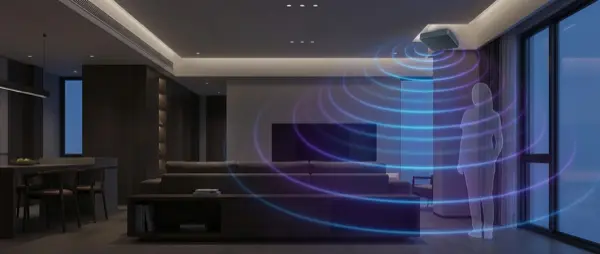
An mmWave (millimeter wave) sensor emits high-frequency radio waves (typically 24GHz or 60GHz) and measures their reflections. It works exactly like radar — the waves bounce off objects and bodies, and the sensor analyzes micro-changes in the reflected signal using FMCW (Frequency Modulated Continuous Wave) technology.
The result: it can detect:
- Macro-motion: Walking, running (same as PIR)
- Micro-motion: Typing, reading a book, hand movements
- Static presence: Breathing, heartbeat — even when you're completely still
- Fall detection: Detecting when a person falls (premium models)
mmWave vs PIR: Full Comparison
| Feature | PIR (Passive Infrared) | mmWave (Radar) |
|---|---|---|
| Motion detection | ✅ Excellent | ✅ Excellent |
| Presence detection | ❌ Not possible | ✅ Yes (breathing) |
| Fall detection | ❌ No | ✅ Premium models |
| Zone detection | ❌ No | ✅ FP2, EP1 |
| Power source | Battery (2-5 years) | USB-C (continuous) |
| Price | €8-25 | €25-55 |
| False positives | Moderate (heat, pets) | Low (after tuning) |
| Trigger speed | ~0.5 sec | ~1-2 sec |
| Through-wall detection | ❌ Not possible | ⚠️ Partially (thin materials) |
Rule of thumb: Use PIR in transit areas (hallways, stairways) where you need fast trigger response. Use mmWave in occupied spaces (living room, office, bedroom) where you sit still for extended periods.
Top mmWave Models 2026
Aqara Presence Sensor FP2 — €45-55
The king of mmWave sensors. 24GHz radar with zone detection — you can define multiple zones within a single room (e.g., desk zone, couch zone, door zone) and each zone can trigger different automations. 5m range, 120° angle, WiFi connection. Supports HomeKit, Home Assistant (excellent integration), and Alexa. Includes fall detection for elderly care.
Pros: Zone detection, fall detection, HomeKit support, very reliable after tuning.
Cons: WiFi only (requires some configuration), no native Google Home support.
Aqara Presence Sensor FP1E — €25-30
The budget version. Zigbee 3.0 instead of WiFi, no zone detection. But excellent for basic presence detection in a single room. Ideal if you don't need zones but want mmWave capabilities at an affordable price.
Everything Presence One — €35-45
The open-source champion. Based on ESP32 + HLK-LD2410, runs ESPHome firmware. Includes mmWave + PIR + light sensor + temperature/humidity sensor. Full Home Assistant integration, customizable firmware, community blueprints. Requires USB-C power.
Everything Presence Lite — €20-25
The stripped-down version. Just mmWave radar + ESP32 on a small PCB. Ideal for DIY users who want to build custom housings. Excellent value for money.
Tuya/MOES mmWave Sensor — €15-25
Budget option via AliExpress. Available in ZigBee or WiFi variants, basic mmWave detection. Quality varies significantly — some models are excellent, others unreliable. Do your research before buying.
| Model | Price | Zones | Protocol | Best For |
|---|---|---|---|---|
| Aqara FP2 | €45-55 | ✅ Multiple | WiFi | Power users, HomeKit |
| Aqara FP1E | €25-30 | ❌ | Zigbee | Budget mmWave |
| EP One | €35-45 | ✅ Via HA | WiFi (ESPHome) | Home Assistant, DIY |
| EP Lite | €20-25 | ❌ | WiFi (ESPHome) | DIY makers |
| Tuya/MOES | €15-25 | ❌ | Zigbee/WiFi | Ultra budget |
Zone Detection: The Killer Feature
The most impressive capability of the FP2 (and similar sensors) is zone detection. Within the same room, you can define:
- Desk zone: If someone is at the desk → desk light ON, PC monitor wake
- Couch zone: If someone is on the couch → ambient lighting, TV ON
- Door zone: If someone enters/exits → main lights ON/OFF
- People counting: The FP2 can count how many people are in the room
This means a single sensor can replace 2-3 PIR sensors and deliver far more accurate automations with contextual awareness.
📖 Read more: Home Assistant 2026: Complete Beginner Setup Guide
Installation & Setup
mmWave Placement Rules
- Ceiling or high mount: The ideal placement is ceiling-mounted (facing down) or at 2.2-2.5m height. This provides the best zone coverage.
- Avoid fans: Moving fan blades trigger false alarms consistently
- Keep away from windows: Curtains blowing in the breeze can be detected as movement
- Center of room: For zones, ideally mount in the center or in a corner that “sees” the entire room
- USB power required: You need a power outlet or USB extension cable nearby
Sensitivity Tuning
Initial sensitivity calibration is critical. Too high → false positives (detecting curtains, fans, pets). Too low → misses stationary people. The recommended process:
- Mount the sensor and set high sensitivity initially
- Leave the room — if it shows “occupied” with nobody there, reduce sensitivity
- Sit motionless on the couch — if it shows “clear”, increase sensitivity
- Find the sweet spot over 2-3 days of testing and adjustment
Automations with mmWave
Smart Lighting
Zone-based lighting: Desk zone → task light. Couch zone → ambient. Walk-in → full lights. Your lighting follows your position throughout the room.
Entertainment Automation
Sitting on couch + TV zone active → dim lights, close blinds, engage Hue Sync mode. Stand up → lights on, TV pause.
Fall Detection
Essential for elderly care: if the sensor detects a fall → trigger alarm + push notification to family members + emergency SOS call. This feature can literally save lives.
Ideal Users
- Remote workers: Lights and AC never turn off while you're working motionless at your desk
- Elderly caregivers: Fall detection + presence monitoring for peace of mind
- Gamers: Zone-based ambient lighting that changes based on your position
- Smart home enthusiasts: Zone automations, room-level presence, people counting
- Energy savers: HVAC runs only in actually occupied rooms
Final Recommendation
For the ultimate experience: Aqara FP2 — zones, fall detection, HomeKit, excellent Home Assistant integration. €45-55 for the most capable sensor on the market.
For value for money: Aqara FP1E (€25-30) — Zigbee, basic mmWave, excellent presence detection without zone support.
For open-source & DIY: Everything Presence One (€35-45) — ESPHome, full customization, community blueprints, includes PIR+mmWave+lux+temp sensors.
The mmWave presence sensor is the upgrade you didn't know you needed. Once you try one, you'll never go back to PIR alone.