📖 Read more: Philips Hue vs IKEA vs Govee: 2026 Comparison
Why Lighting Transforms Your Gaming Experience
A gaming room isn't complete with just a powerful GPU and a good monitor. Smart lighting radically transforms the room's atmosphere, reduces eye strain, and creates an immersive environment that elevates every gaming session. In 2026, smart lights have evolved significantly — with reactive lighting that responds to gameplay in real time, RGBIC technology for millions of simultaneous colours, and deep integration with PCs and consoles.
This guide covers the best smart lights for gaming rooms, optimal placement strategies, automation scenes you can build, and how to achieve the perfect setup without spending a fortune.
Top Smart Lights for Gaming 2026
Nanoleaf Shapes & 4D
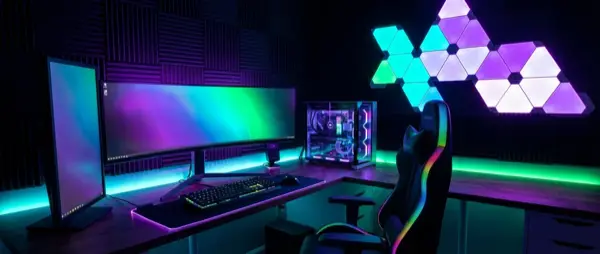
Nanoleaf remains the favourite brand among gamers. The Nanoleaf Shapes (Hexagons, Triangles, Elements) mount on walls to create stunning geometric patterns. Each panel features independent colour zones, touch-reactive functionality, and rhythm mode that syncs with music.
The Nanoleaf 4D Screen Mirror Kit (from €100) uses a camera that analyses your screen's colours and reproduces them on an LED strip behind your TV or monitor. The result: an Ambilight-like effect for any display.
Govee DreamView & Gaming Lights
Govee offers exceptional value for money. The Govee DreamView T1/G1 (€45-80) combine an LED strip behind the monitor with side light bars on the desk, creating unified reactive lighting. The camera analyses what's on screen in real time and maps the colours accordingly.
The Govee Glide Wall Light (€80-110) are modern wall-mounted light tubes with RGBIC technology — each segment displays a different colour simultaneously. Ideal accent lighting behind your gaming chair or above the desk.
Philips Hue Play & Gradient
Philips Hue targets the premium gaming experience. The Hue Play Bars (set €130) sit behind the monitor, while the Hue Play Gradient Lightstrip (€180+) creates multi-colour bias lighting across the entire back of the screen.
With the Hue Sync Box (€250) or the free Hue Sync Desktop app, lights react in real time to whatever appears on screen — ideal for both gaming and movies. Integration with Razer Synapse and Corsair iCUE brings Hue lights into perfect harmony with your RGB peripherals.
LIFX & Corsair iCUE
The LIFX Z LED Strips offer multizone colour without a hub, while the Corsair iCUE LS100 (€90) are designed exclusively for gaming monitors. They connect to the PC via USB and sync automatically with on-screen colours through iCUE software.
📖 Read more: Circadian Lighting: Light That Follows Your Day
Top Gaming Lights Comparison
| Product | Price | Screen Sync | Hub | Best For |
|---|---|---|---|---|
| Nanoleaf 4D | €100 | Camera | Wi-Fi | Monitor/TV bias light |
| Nanoleaf Shapes (9pk) | €200 | Rhythm mode | Wi-Fi | Wall behind setup |
| Govee DreamView T1 | €60 | Camera | Wi-Fi/BT | Budget reactive lighting |
| Govee Glide Wall | €90 | Music sync | Wi-Fi/BT | Accent wall lighting |
| Hue Play Bars (2x) | €130 | Hue Sync app | Zigbee/Bridge | Premium bias light |
| Hue Gradient Strip | €180 | Hue Sync app | Zigbee/Bridge | Full-surround monitor |
| Corsair iCUE LS100 | €90 | USB/software | USB | PC-specific sync |
| LIFX Z Strip (2m) | €80 | Third-party | Wi-Fi | Hubless multizone |
Where to Place Your Lights
Bias Lighting (Behind the Monitor)
The most important position is behind the monitor. Bias lighting drastically reduces eye fatigue during long gaming sessions by softening the brightness difference between screen and wall. Use an LED strip (Govee or Nanoleaf 4D) or Hue Play Bars in warm white (2700K-4000K) for daily use, and reactive RGB during gaming.
Wall Behind the Setup
Nanoleaf Shapes or Govee Glide Wall Lights on the wall behind or beside the monitor create dramatic effect. Mount them at eye level in a formation that suits your style — hexagon honeycomb or geometric pattern.
Under the Desk
A simple RGBIC LED strip under the desk creates an ambient glow on the floor. This effect, combined with bias lighting, produces a floating effect for the desk. Cost: €15-25 with a Govee or TP-Link Tapo strip.
Shelves & Display Cases
If you have shelves with collectible figures, gaming accessories, or consoles, place small LED strips inside. You can group them in the same scene as your other gaming lights.
Screen Sync: Reactive Lighting
Reactive (screen sync) lighting is what truly distinguishes a gaming setup. The technology analyses on-screen colours in real time and reproduces them in surrounding lights. The main methods:
- Camera-based (Govee, Nanoleaf 4D): A small camera mounts on top of the monitor and “sees” the colours. Easy installation, works with any source (PC, console). Latency ~100ms.
- Software-based (Hue Sync Desktop, Signal RGB): An app on the PC reads pixels directly. Lower latency (~30ms) but only works with PC.
- HDMI Passthrough (Hue Sync Box): Accepts HDMI input, analyses frames, and sends colour commands. Works with consoles (PS5, Xbox) and streaming boxes. Latency ~50ms.
- USB Direct (Corsair iCUE LS100): Strips connect to the PC via USB. Lowest latency, PC-only.
📖 Read more: Lighting Automation: Scenarios and Tips 2026
Automation Scenes
Scene: Start Gaming
Create a “Gaming Mode” scene in the Nanoleaf, Govee, or Hue app that activates: reactive RGB behind the monitor, dim red underglow below the desk, Nanoleaf Shapes in dynamic palette, and turns off the main room light. Trigger it with a voice command: "Alexa, gaming mode."
Scene: Chill / Relax
Warm white (2700K) bias lighting, pastel colours on Nanoleaf Shapes in slow transition, 30% brightness. Ideal for browsing or YouTube after gaming.
Scene: Stream Mode
If you stream, you want consistent colours (not reactive) as your backdrop. Choose 2-3 complementary colours that match your brand and set them to static mode. Add a key light (e.g. Elgato Key Light) for proper face lighting.
Apps & Integration
| App | Compatible Lights | Key Features |
|---|---|---|
| Nanoleaf App | Nanoleaf only | Screen mirror, rhythm, scenes, schedules |
| Govee Home | Govee only | DreamView sync, DIY scenes, music mode |
| Philips Hue App | Hue only | Hue Sync, entertainment zones, Razer integration |
| SignalRGB | Multiple brands | Unified PC control — Govee, Hue, Nanoleaf, LIFX |
| Home Assistant | All | Full automation, API access, custom automations |
Budget vs Premium Setups
Budget Setup (€80-120)
- Govee DreamView T1 (€60) — reactive monitor lighting
- Govee RGBIC LED strip 3m (€25) — desk underglow
- Total: ~€85
Mid-Range Setup (€200-300)
- Nanoleaf 4D Screen Mirror (€100)
- Govee Glide Wall Light (€90)
- LED strip underglow (€25)
- Total: ~€215
Premium Setup (€400-600)
- Philips Hue Play Bars x2 (€130)
- Nanoleaf Shapes 9-pack (€200)
- Hue Gradient Lightstrip (€180)
- Total: ~€510
Tips & Mistakes to Avoid
- Don't overdo the colours: Too many simultaneous colours are fatiguing. Stick to 2-3 colours max per scene.
- Bias lighting ≠ RGB party: For daily use, warm white bias lighting is better. Save RGB for gaming sessions.
- Brightness: In a dark room, keep bias lighting at 15-30%. Too bright = reflections on the screen.
- Camera placement: For camera-based sync, the camera must “see” the entire screen. Centre it on top.
- Wi-Fi bandwidth: Many Wi-Fi lights can saturate a weak router. Consider Zigbee-based (Hue) if you have 10+ devices.
- Power supply: Long LED strips need adequate power. Don't use cheap power adapters — they can overheat.
Conclusion
Smart gaming room lighting is no longer a luxury but an integral part of a proper setup. With a budget of €85-510 depending on your needs, you can create an immersive environment that reacts to gameplay, reduces eye fatigue, and impresses.
For budget gamers, the Govee DreamView T1 paired with an LED strip underglow delivers stunning results for under €90. For enthusiasts, the Nanoleaf Shapes + Hue Play combination creates a visually stunning setup worthy of admiration. Start with bias lighting behind the monitor — it's the single change that makes the biggest difference.