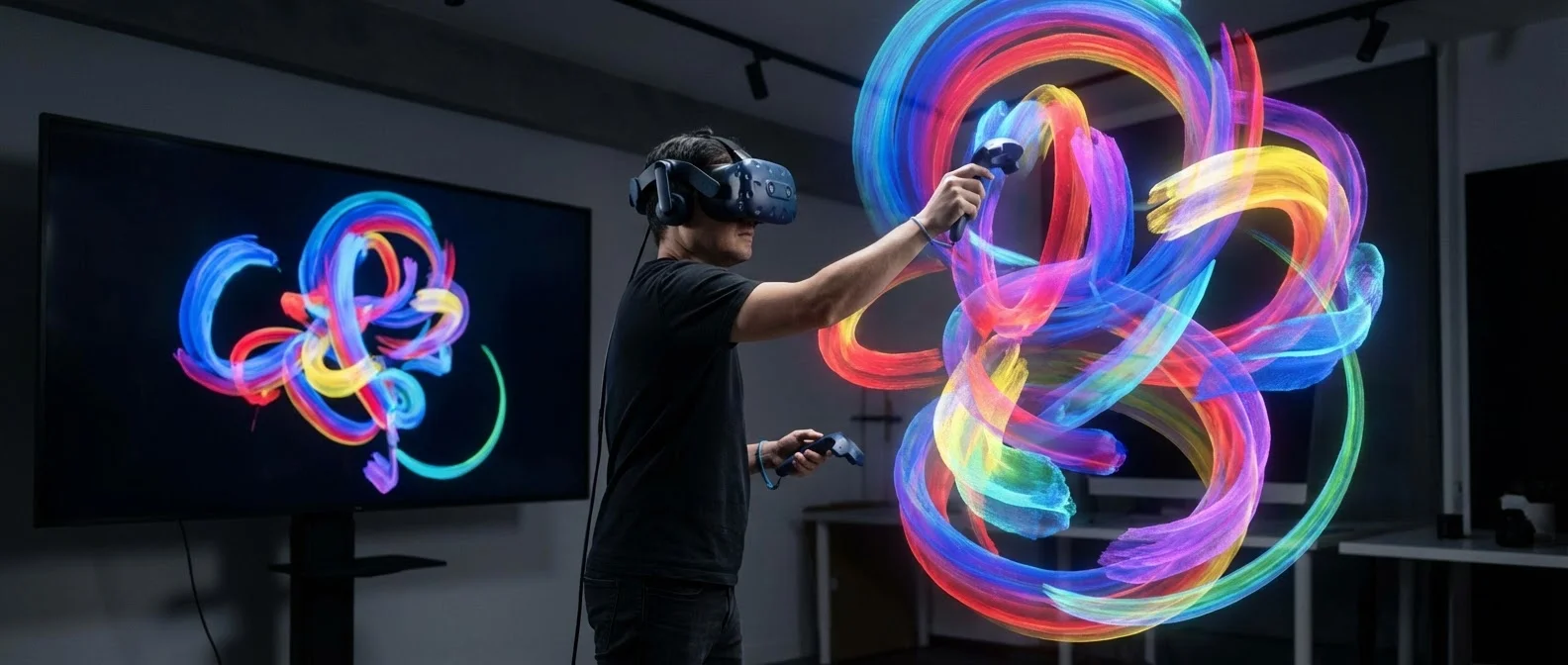
Virtual reality is no longer just for gaming. It has evolved into a revolutionary canvas for artists, designers, and creators who paint, sculpt, and build entire worlds in three-dimensional space. From brushstrokes of light hovering in mid-air to photorealistic architectural models, VR art is rewriting the rules of creative expression.
📖 Read more: VR Concerts: Live Events in the Digital World
Painting in Mid-Air: Open Brush & Tilt Brush
Tilt Brush by Google was the application that introduced VR art to the mainstream. Users could literally paint in three-dimensional space, using brushes made of fire, stars, neon light, and smoke. After Google discontinued development, the project continued as Open Brush — an open-source version actively developed by the community.
Open Brush offers dozens of new brushes, support for exporting to multiple formats (FBX, GLTF, USD), and the ability to upload creations to platforms like Sketchfab. The feeling of standing inside your own artwork and seeing it around you at full scale is an experience no 2D screen can replicate.
Key Features of Open Brush
100+ Brushes
Fire, star, rainbow, neon, snow and many more effects for unique creations.
3D Export
Export artwork to FBX, GLTF, USD for use in game engines, 3D printing, or animation.
Open Source
Free software with an active community continuously adding new capabilities.
Multi-Platform
Available on Meta Quest, SteamVR, Pico, and other headsets.
Gravity Sketch: Industrial Design in VR
While Open Brush targets free artistic expression, Gravity Sketch is aimed at professional design. It is a tool used by designers at companies such as Ford, Adidas, Lamborghini, and Puma for designing cars, shoes, furniture, and products.
Gravity Sketch’s power lies in the ability to design at full scale — for example, standing next to a car you just created and evaluating its proportions without needing stacks of renders. The tool supports NURBS curves, SubD surfaces, and export to CAD formats.
💡 Did you know? Ford uses Gravity Sketch for the early design phase of new car models, reducing prototyping time by 40% compared to traditional methods.
Quill by Meta: Filmmaking in VR
Quill, created by Meta (formerly Oculus), is a VR painting and animation tool that goes beyond static art. With Quill, artists can create animated short films entirely within VR.
Quill’s most iconic creation is the film "Dear Angelica" — a moving mother-daughter story considered one of the first masterpieces of VR animation. Every frame was hand-painted inside VR, creating a uniquely immersive experience.
Notable VR Films and Experiences
- Dear Angelica — hand-painted VR animated film, festival award winner
- The Line — narrative experience designed entirely in Quill
- Gloomy Eyes — VR animation narrated by Colin Farrell
- Namoo — poetic VR short film about the cycle of life
📖 Read more: VR Meditation: Virtual Nature Relaxation
Sculpting & 3D Modeling in VR
Beyond painting, VR offers exceptional 3D sculpting tools. Medium by Adobe (formerly Oculus Medium) allows users to mold digital clay in space, as if working in a real sculpture studio. The natural feeling of “gripping” and shaping material in 3D space makes creation more intuitive.
ShapesXR stands out as a collaborative design tool. Multiple users can join the same virtual space and work together on prototypes, UX mockups, and 3D scenes. It is widely used in tech companies for spatial design reviews.
Comparison of Popular VR Art Tools
| Tool | Type | Cost | Platform |
|---|---|---|---|
| Open Brush | 3D Painting | Free | Quest, SteamVR |
| Gravity Sketch | Product Design | Free / Pro | Quest, SteamVR |
| Quill | Animation & Painting | Free | Quest |
| Medium (Adobe) | 3D Sculpting | $19.99 | Quest |
| Vermillion | Oil Painting | $19.99 | Quest, SteamVR |
| ShapesXR | Collaborative Design | Free / Teams | Quest |
Vermillion: Realistic Oil Painting in VR
If you love traditional painting, Vermillion will impress you. It is a VR application that simulates oil painting with stunning accuracy — mixing colors on the palette, brush thickness, canvas texture, even the sensation of paint drying.
Artists who try Vermillion report that the experience is the closest thing to real painting without the mess and the cost of materials. It supports reference images, multiple canvas sizes, and multiplayer sessions for painting together.
“The moment I picked up the brush in Vermillion, I forgot I was wearing a headset. My hand knew what to do — I simply painted.”
— Alex K., VR artist & painterVirtual Galleries & NFT Art
VR is changing not only how art is created but also how it is exhibited and consumed. Platforms like Spatial, Museum of Other Realities (MOR), and VRChat worlds host virtual exhibitions where you can walk among three-dimensional sculptures and paintings.
The connection between VR art and NFTs has created new economic models for artists. Platforms such as Oncyber and Somnium Space allow the creation of virtual galleries where each artwork is linked to an NFT on the blockchain, verifying authenticity and ownership.
Educational Applications
VR art finds significant applications in education:
Architecture
Architecture students create buildings at full scale and walk through them before they are ever constructed.
Anatomy
Medical students study three-dimensional anatomy models, disassembling organs in space.
📖 Read more: VR Mental Health: Treating PTSD with Virtual Reality
Art History
Virtual visits to museum recreations and historical sites in VR.
3D Design
Industrial design courses with hands-on experience using Gravity Sketch tools.
VR Artist Communities
VR art has spawned vibrant online communities. On Reddit (r/OpenBrush, r/VRArt), Discord, and VR social platforms, thousands of artists share work, techniques, and tutorials. Festivals like Venice VR Expanded in Venice and Tribeca Immersive showcase the best VR art projects each year.
Many artists live-stream their creative process on platforms like Twitch and YouTube, showing in real time how they paint in Open Brush or sculpt in Medium.
Getting Started Guide for Beginners
Step 1: Choose Your Hardware
The Meta Quest 3 or Quest 3S is the ideal starting point — standalone, no PC required, with access to all major VR art tools. For more demanding work, a PCVR headset (Valve Index, HP Reverb G2) paired with a powerful PC delivers top-tier quality.
Step 2: Start with Open Brush
Download Open Brush for free from the Meta Quest Store or SteamVR. Start with the basic brushes, explore the effects, and paint freely without pressure for results.
Step 3: Explore Different Tools
Try Gravity Sketch for design, Vermillion for painting, or Quill for animation. Each tool has a different philosophy, and you will find the one that matches your style.
Step 4: Share Your Work
Upload your creations to Sketchfab, ArtStation, or Poly.pizza. Join communities, ask for feedback, and participate in VR art challenges.
🎯 Pro Tip: Don’t start with mega-projects. Paint simple objects — a flower, a cup, a scene from your imagination. The joy of VR art is in the process, not just the result.
The Future of VR Art
With the evolution of mixed reality headsets, AI-assisted creation, and haptic feedback technology, VR art is on a trajectory of rapid growth. The integration of AI will enable the creation of base scenes with voice prompts, while haptic gloves will add a sense of touch to sculpting. VR art does not replace traditional art — it extends it into new dimensions.