📖 Read more: Discord for Gamers: Complete Guide
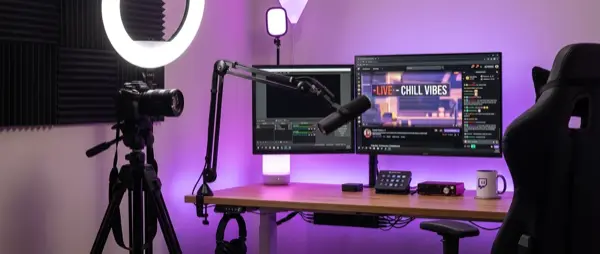
🎙️ Equipment: What You Need to Get Started
You don't need thousands of euros worth of equipment to start. However, there's a minimum that makes the difference between an amateur and a respectable stream.
🎙️ Microphone
Budget: Fifine K669B (~€30) — USB, plug & play, excellent for beginners.
Mid: Blue Yeti (~€100) — The classic streaming mic, 4 patterns.
Pro: Shure SM7B (~€400) — The pro streamers' mic. Requires audio interface (Focusrite Scarlett).
📷 Camera (Webcam)
Budget: Logitech C920 (~€60) — Full HD, auto focus. Enough for 95% of streamers.
Pro: Elgato Facecam Pro (~€300) — 4K/60fps, manual controls.
Alternative: DSLR/Mirrorless with Elgato Cam Link for cinema quality.
🎥 Capture Card
Essential if you stream from console (PS5/Xbox/Switch).
Internal: Elgato HD60 X (~€160) — 4K passthrough, 1080p60 capture.
USB: AVerMedia Live Gamer (~€120) — Plug & play, portable.
💡 Lighting
Ring Light: Neewer 18" (~€40) — Even facial lighting.
Key Light: Elgato Key Light (~€150) — App-controlled, professional.
Budget: 2x desk lamps with daylight bulbs (~€20).
🎯 Equipment Priority
The investment order should be: 1) Microphone (audio is #1 in stream quality), 2) Internet (stable 10+ Mbps upload), 3) Camera, 4) Lighting. Good audio with mediocre video > bad audio with 4K video.
💻 OBS Setup: The Streamer's Tool
OBS Studio (free, open-source) is the streaming standard. You can also use Streamlabs OBS (more user-friendly) or Twitch Studio (basic but easy). Let's cover the OBS setup.
Core Settings
- Output Resolution: 1920x1080 (1080p) is the sweet spot. Don't start with 4K — it requires massive bandwidth
- Bitrate: 4500-6000 kbps for 1080p/60fps. Limited internet? Go 720p/3000kbps
- Encoder: NVENC (if you have NVIDIA GPU) or x264 (CPU). NVENC leaves the CPU free for the game
- Frame Rate: 60fps for gaming, 30fps is fine for Just Chatting/IRL
- Audio: 160kbps AAC, separate tracks for mic and desktop audio
Scenes & Sources
Create separate scenes for each state:
- Starting Soon: Animated screen with countdown + music
- Gameplay: Game capture + webcam overlay + chat + alerts
- BRB (Be Right Back): Placeholder screen for breaks
- Just Chatting: Large webcam + chat + background image
- Ending: Outro screen with social links + “thanks for watching”
📖 Read more: Esports in Greece: The Scene in 2026
🎨 Overlays & Alerts: Your Visual Identity
Overlays and alerts are what make your stream stand out. A professional overlay creates brand identity and makes the stream more attractive.
🎨 Overlays
Webcam Frame: Border around your webcam.
Chat Box: On-screen chat for fullscreen viewers.
Recent Events: Latest follower, sub, donation panel.
Goals: Follower/sub goal bar.
🔔 Alerts
Follow Alert: Animation + sound for each new follower.
Sub Alert: Bigger animation for subscribers.
Donation/Bits Alert: Custom alert for tips and bits.
Raid Alert: Exciting alert for incoming raids.
🌐 Where to Find Them
Free: StreamElements, Streamlabs free packs, Nerd or Die.
Premium: OWN3D, Visuals by Impulse (~€15-40).
Custom: Fiverr designers (€20-100) for unique branding.
⚙️ Setup
Use StreamElements or Streamlabs for alert management. Add as browser source in OBS via URL. Always test before going live!
📱 Twitch Account: Proper Profile Setup
Your profile is your channel's business card. It's the first thing a viewer sees when they enter your channel.
What to Configure
- Profile Picture: Clear logo or avatar — recognizable even at small sizes
- Banner: 1200x480 px, showing schedule or content highlights
- Bio: Short description: what you play, when you stream, what to expect
- Panels: About, Schedule, PC Specs, Social Links, Rules, Donations — below the stream
- Tags: Add relevant tags (language, game, playstyle) for discoverability
- Stream Title: Make it engaging: “Ranked Push to Diamond! | !socials !discord” instead of just “playing Valorant”
📈 Growing Your Audience: From 0 to Community
The hardest part of streaming is building an audience. The first 100 followers are the toughest. Let's look at strategies that actually work.
Growth Strategies
- Networking: Join other streams, become known in the community. No spam — authentic participation only
- Cross-Platform: Post highlights on TikTok, YouTube Shorts, Instagram Reels. Short-form content drives viewers
- Discord Community: Build a Discord server for your community — keeps viewers engaged offline
- Niche Down: Don't play everything. Pick 1-2 games or a genre and become known for it
- Raids & Hosts: Raid other streamers at the end of your stream — karma comes back
⚠️ Don't Buy Followers!
Fake followers/viewers violate Twitch ToS and lead to bans. Plus, they ruin your analytics and nobody is fooled. Organic growth only.
📖 Read more: Gaming and Mental Health: Complete Guide
💰 Monetization: Affiliate & Partner
Twitch offers two monetization tiers. Both require specific milestones.
🌟 Twitch Affiliate
Requirements: 50 followers, 500 minutes broadcast (last 30 days), 7 unique broadcast days, 3 average viewers.
Benefits: Subs (€4.99), Bits, ad revenue, emotes (1 slot), channel points.
💎 Twitch Partner
Requirements: 75 average viewers, 25h broadcast/month, 12 unique broadcast days/month.
Benefits: Everything from Affiliate + custom emotes (many slots), verified badge, priority support, better revenue split.
Other Revenue Sources
- Donations: Via StreamElements or Streamlabs — tips go directly to you
- Sponsorships: Brands pay for product placement. From 200-300 viewers and up
- Merch: T-shirts, hoodies, stickers via Streamlabs Merch or Spring
- YouTube VODs: Upload highlights to YouTube for ad revenue
📅 Consistency: The Secret Weapon
No successful streamer got there by streaming whenever they felt like it. Consistency is the most important factor for growth.
Schedule Tips
- Set a fixed schedule: At least 3-4 streams/week, same days and times
- Duration: 2-4 hours per stream is enough. Better 3 hours with energy than 6 hours exhausted
- Announce your schedule: Put it on your Twitch profile, Discord, and social media
- Don't burn out: Burnout is a real danger. Keep rest days and don't overdo it
📋 Conclusion & Quick Start Checklist
Twitch streaming is one of the most rewarding experiences in gaming — you share your passion with others and build a community. Start today with what you have and upgrade gradually.
Quick Start Checklist
- ✅ Equipment: Microphone + camera + lighting
- ✅ OBS Studio installed with proper settings
- ✅ Scenes: Starting Soon, Gameplay, BRB, Ending
- ✅ Overlays and alerts configured
- ✅ Twitch profile completed (bio, panels, banner)
- ✅ Fixed schedule 3-4x/week
- ✅ Discord server for community
- ✅ Cross-platform highlights (TikTok/YouTube Shorts)
- ✅ Goal: Affiliate within 1-3 months