📖 Read more: Gaming Monitor 4K: Buying Guide 2026
🖥️ Desk Selection: The Foundation of Your Setup
Your desk is literally the foundation of your entire gaming setup. The wrong choice can mean cramped space, poor peripheral placement, and even long-term health issues. Let's break down what to look for.
Dimensions and Depth
For a single monitor setup, you need at least 120cm width and 60cm depth. If you're planning for dual or ultrawide monitors, go for 160cm+. Depth is critical because it determines how far the screen will be from your eyes — the ideal distance is 50-75cm.
Standing Desk vs Traditional
Standing desks (or sit-stand desks) have become extremely popular. Models like the FlexiSpot E7 or Uplift V2 allow height adjustment via an electric motor. Alternating between sitting and standing every 45-60 minutes reduces musculoskeletal pain by 54% according to recent studies.
💡 Pro Tip: Surface Material
If you use a full-desk mat/mousepad, the surface material doesn't matter as much. However, if you want a bare surface, opt for MDF or solid wood. Avoid glass — it looks nice but reflects and feels cold to the touch.
🪑 Chair Ergonomics: Your Health Above All
Your gaming chair is perhaps the most important investment. If you sit 6-10 hours a day, a bad chair can cause chronic pain in your back, neck, and shoulders.
🏎️ Gaming Chairs (Racing Style)
SecretLab Titan, noblechairs HERO. Impressive aesthetics, adjustable armrests, recline function. Prices €300-600. Great for moderate usage hours.
🏢 Ergonomic Chairs
Herman Miller Aeron, Steelcase Leap. Premium lumbar support, mesh back for ventilation. Prices €800-1500. Ideal for 8+ daily hours.
💰 Budget Options
IKEA Markus, Hbada Ergonomic. Decent ergonomics at a low cost. Prices €150-300. Suitable for casual gamers.
⚙️ What to Check
Adjustable seat height, lumbar support, armrest adjustment (4D ideally), headrest, seat depth adjustment. Everything should be customizable to your body.
🖥️ Monitor Positioning: The Perfect Placement
Proper monitor placement is critical for both your eyes and your neck. A poorly positioned monitor can cause eye strain, headaches, and neck pain.
Basic Rules
- Height: The top of the screen should be at eye level or slightly below
- Distance: 50-75cm from your eyes (arm's length rule)
- Tilt: 10-20 degree tilt backward to minimize reflections
- Monitor Arms: VESA mount arms (e.g., Ergotron LX) provide movement freedom and free up desk space
Multi-Monitor Setup
If you use 2 or 3 monitors, the primary one should be directly in front of you. Secondary monitors are positioned at 15-30 degree angles. Use monitor arms with dual/triple mounts for uniform alignment. For triple setups, consider a curved ultrawide (e.g., Samsung Odyssey G9) instead of three separate ones — it eliminates bezels and provides a more immersive experience.
💡 RGB Lighting: From Ambient to Reactive
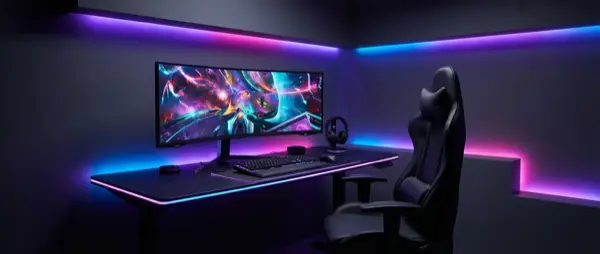
Lighting isn't just an aesthetic choice — proper ambient lighting reduces eye strain, while bias lighting behind the monitor improves perceived contrast. Plus, a good RGB setup makes every gaming session more atmospheric.
💡 LED Strips
Govee RGBIC, Philips Hue Lightstrip. Place them behind the monitor, under the desk, or along the room perimeter. Budget: €20-80.
🔺 Nanoleaf Panels
Nanoleaf Shapes, Lines, or 4D. Modular light panels that create stunning wall patterns. Screen-mirroring mode for reactive lighting. Budget: €150-400.
💻 Monitor Light Bar
BenQ ScreenBar, Xiaomi Light Bar. Reduces eye strain by illuminating the desk without screen reflections. Essential for night gaming. Budget: €30-100.
🎮 Reactive Lighting
Govee DreamView, Philips Hue Sync Box. Sync lighting with what's on screen. Explosions = red flash, nature = green ambient. Budget: €50-250.
⚡ Tip: Color Temperature
For gaming, use cool white (5000-6500K) during competitive sessions and warm white (2700-3500K) for casual/chill gaming. Many smart lights automatically adjust temperature via app.
🔌 Cable Management: Order in the Chaos
A gaming setup with cables hanging everywhere isn't just ugly — it's hard to maintain, creates fire risk if ventilation is blocked, and psychologically reduces the sense of order in your setup.
Cable Management Equipment
- Cable Tray: Metal or plastic under-desk tray for power strips and excess cables (€15-30)
- Cable Sleeves: Neoprene or braided sleeves group multiple cables into one (€8-15)
- Velcro Ties: Reusable and don't damage cables unlike zip ties (€5-10)
- Cable Clips: Adhesive clips on the back of the desk for routing (€5-8)
- Wireless Peripherals: Wireless mouse, keyboard, and headset instantly eliminate 3 cables
Step-by-Step Process
- Disconnect everything and clean up
- Plan the route for each cable
- Group cables by device (monitor cables, peripherals, power)
- Use cable tray for power strip and adapters
- Run sleeves on visible sections
- Secure with velcro ties every 30cm
🔊 Acoustic Treatment: Sound Without Echo
Whether you stream, voice chat, or simply want better audio, room acoustics play a huge role. A room full of hard surfaces (walls, glass, desk) creates echo and reverb that ruins both recordings and general listening experience.
Key Solutions
- Acoustic Foam Panels: Place 12-16 panels at first reflection points. Budget: €30-80
- Bass Traps: In the corners of the room to reduce low-frequency buildup. Budget: €40-100
- Rug/Carpet: A large rug under the gaming area significantly reduces reflections. Budget: €30-100
- Curtains: Heavy blackout curtains act as sound absorbers. Budget: €40-80
- Bookshelf/Diffusion: A full bookshelf acts as a sound diffuser, breaking up sound waves
📐 Optimal Room Layout
The placement of every element in the room affects your gaming experience. Here are some rules to follow:
- Desk away from window: Avoid glare on screen. If not possible, use blackout curtains or position the screen perpendicular to the window
- PC on floor or stand: On the desk it takes space but collects less dust. On the floor it needs a stand (€15-30) for ventilation
- Router near PC: If using WiFi, keep the router close. Ideally, use an ethernet cable — more stable ping
- Headset Stand: Wall-mounted or desk-mounted stand keeps headphones off the desk
- Ambient Zone: A small sofa or bean bag for relaxation between sessions
💰 Budget Tiers: What It Actually Costs
Let's break things into three budget tiers so you can see what's achievable based on your budget.
💵 Budget Tier ($500)
Desk: IKEA Linnmon/Alex combo (~$100)
Chair: IKEA Markus (~$200)
Lighting: Govee LED Strip basic (~$25)
Cable Management: Velcro ties + clips (~$15)
Monitor Arm: Amazon Basics (~$25)
Extras: Desk mat, headset stand (~$35)
Solid setup for everyday gaming.
💎 Mid-Range Tier ($1,000)
Desk: FlexiSpot E7 sit-stand (~$400)
Chair: SecretLab Titan (~$350)
Lighting: Govee RGBIC + BenQ ScreenBar (~$100)
Cable Management: Full kit + wireless peripherals (~$60)
Acoustics: Basic foam panels (~$40)
Extras: Nanoleaf mini kit (~$50)
Excellent value for money.
👑 Premium Tier ($2,000+)
Desk: Uplift V2 walnut top (~$700)
Chair: Herman Miller Aeron (~$800)
Lighting: Philips Hue full ecosystem (~$350)
Cable Management: Custom under-desk setup (~$80)
Acoustics: Professional panels + bass traps (~$150)
Extras: Nanoleaf Shapes, wireless charger, ambiance (~$200)
Pro-level setup with no compromises.
🎯 Where to Invest First
If you have limited budget, the priority order is: 1) Chair (health), 2) Monitor positioning (performance), 3) Cable management (order), 4) Lighting (atmosphere). Always chair first — your back will thank you.
🛒 Conclusion and Checklist
A perfect gaming room isn't built in a day. Start with the basics — desk, chair, proper monitor placement — and gradually add lighting, acoustic treatment, and aesthetic upgrades. Every improvement, no matter how small, makes a difference in your daily experience.
Quick Checklist
- ✅ Desk 120cm+ width, 60cm+ depth
- ✅ Ergonomic chair with lumbar support
- ✅ Monitor at eye level, 50-75cm distance
- ✅ Bias lighting behind the monitor
- ✅ Cable management tray + velcro ties
- ✅ Basic acoustic treatment (foam panels or rug)
- ✅ Desk away from window or perpendicular
- ✅ Ethernet over WiFi for competitive gaming