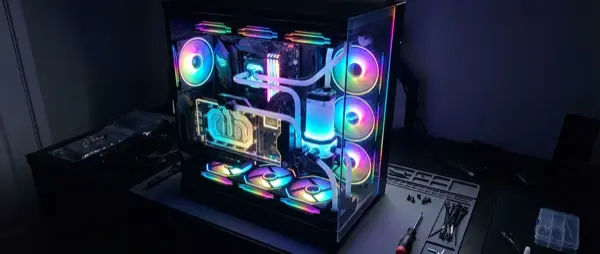
2026 is the best year to build a custom gaming PC. New CPU and GPU generations, SSD speeds reaching 14 GB/s, and DDR5 RAM at affordable prices. This guide takes you step-by-step from choosing components to final assembly.
📖 Read more: RTX 5090 vs RX 9070 XT: Ultimate GPU Comparison 2026
The Components: What Does What
CPU (Processor)
The “brain” of the PC. For gaming, 6-8 cores are sufficient. In 2026: AMD Ryzen 9000X3D or Intel Arrow Lake-S.
GPU (Graphics Card)
The most important gaming component. Determines FPS and resolution. NVIDIA RTX 50-series or AMD RX 9000.
RAM (Memory)
DDR5 is now standard. 32GB for gaming, 64GB if you stream/edit simultaneously.
SSD (Storage)
NVMe Gen5 for boot drive (1-2TB). Loading times virtually zero. Speeds up to 14 GB/s.
📖 Read more: SSD NVMe for Gaming: Speed & Guide 2026
CPU: AMD vs Intel 2026
🆚 Processor Comparison
| CPU | Cores/Threads | Gaming Performance | Price |
|---|---|---|---|
| AMD Ryzen 7 9800X3D | 8/16 | 🥇 #1 Gaming CPU (3D V-Cache) | ~€480 |
| AMD Ryzen 5 9600X3D | 6/12 | 🥈 Top value gaming | ~€300 |
| Intel Core Ultra 9 265K | 8P+16E/32T | 🥉 Very powerful all-around | ~€590 |
| Intel Core Ultra 5 245K | 6P+8E/20T | Excellent mid-range | ~€330 |
| AMD Ryzen 5 9600X | 6/12 | Budget champion | ~€220 |
💡 Pro Tip
If the PC is primarily for gaming, go AMD X3D — the 3D V-Cache delivers 15-25% more FPS in demanding titles. If you also do productivity work (rendering, compiling), Intel Arrow Lake is worth considering.
GPU: NVIDIA vs AMD 2026
🎨 Graphics Cards
| GPU | VRAM | Ideal For | Price |
|---|---|---|---|
| NVIDIA RTX 5090 | 32GB GDDR7 | 4K 144Hz, Ray Tracing Ultra | ~€2,000 |
| NVIDIA RTX 5080 | 16GB GDDR7 | 4K 60-120Hz, excellent RT | ~€1,000 |
| NVIDIA RTX 5070 Ti | 16GB GDDR7 | 1440p 144Hz+, 4K 60Hz | ~€750 |
| AMD RX 9070 XT | 16GB GDDR6 | 1440p 120Hz+, FSR 4 | ~€600 |
| NVIDIA RTX 5060 | 8GB GDDR7 | 1080p 144Hz+, budget 1440p | ~€350 |
📖 Read more: Control Resonant: Remedy's Paranormal Sequel Guide
3 Recommended Builds 2026
🟢 Budget Build (~€800)
1080p 60-144Hz Gaming
| Component | Pick | Price |
|---|---|---|
| CPU | AMD Ryzen 5 9600X | €220 |
| GPU | NVIDIA RTX 5060 8GB | €350 |
| RAM | 32GB DDR5-6000 CL30 | €80 |
| SSD | 1TB NVMe Gen4 | €60 |
| Motherboard | B650 AM5 | €120 |
| PSU | 650W 80+ Bronze | €60 |
| Case | Airflow mid-tower | €55 |
| Total | ~€945 |
🟡 Mid-Range Build (~€1,500)
1440p 144Hz Gaming
| Component | Pick | Price |
|---|---|---|
| CPU | AMD Ryzen 7 9800X3D | €480 |
| GPU | NVIDIA RTX 5070 Ti 16GB | €750 |
| RAM | 32GB DDR5-6400 CL32 | €100 |
| SSD | 2TB NVMe Gen5 | €140 |
| Motherboard | X670E AM5 | €200 |
| PSU | 850W 80+ Gold | €110 |
| Case | Premium airflow mid-tower | €100 |
| Total | ~€1,880 |
🔴 High-End Build (~€3,000+)
4K 120Hz+ Ultra Settings
| Component | Pick | Price |
|---|---|---|
| CPU | AMD Ryzen 9 9950X3D | €700 |
| GPU | NVIDIA RTX 5090 32GB | €2,000 |
| RAM | 64GB DDR5-6400 CL30 | €200 |
| SSD | 2TB NVMe Gen5 + 4TB Gen4 | €300 |
| Motherboard | X870E AM5 Premium | €400 |
| PSU | 1000W 80+ Platinum | €180 |
| Case | Full tower / Dual chamber | €180 |
| Cooling | 360mm AIO Liquid | €150 |
| Total | ~€4,110 |
"Never cheap out on the PSU. A bad power supply can destroy your entire system. 80+ Gold minimum."
— JayzTwoCents, PC Building Tips 2025
Assembly Steps
🔧 Build Guide
- 1. Preparation: Anti-static wristband, magnetic screwdriver, good lighting
- 2. CPU → Motherboard: Install CPU first (golden triangle / notch alignment)
- 3. RAM → Motherboard: Correct slots (A2/B2 for dual channel)
- 4. M.2 SSD: Screw into M.2 slot before the motherboard goes in the case
- 5. Cooler: Apply thermal paste (rice-grain size dot) and secure
- 6. Motherboard → Case: Screw with standoffs, connect front panel
- 7. GPU: x16 PCIe slot, connect power cables
- 8. PSU → Cables: Connect 24pin, 8pin CPU, GPU power
- 9. Cable Management: Route cables behind the tray
- 10. Power On: First boot → BIOS → Windows/Linux install
Final Verdict
Building a custom PC in 2026 is easier and more rewarding than ever. DDR5 and SSD prices have dropped dramatically, new CPUs and GPUs deliver a massive performance leap, and assembly is more straightforward. Start with the budget build if you’re a beginner — you can always upgrade component-by-component later.