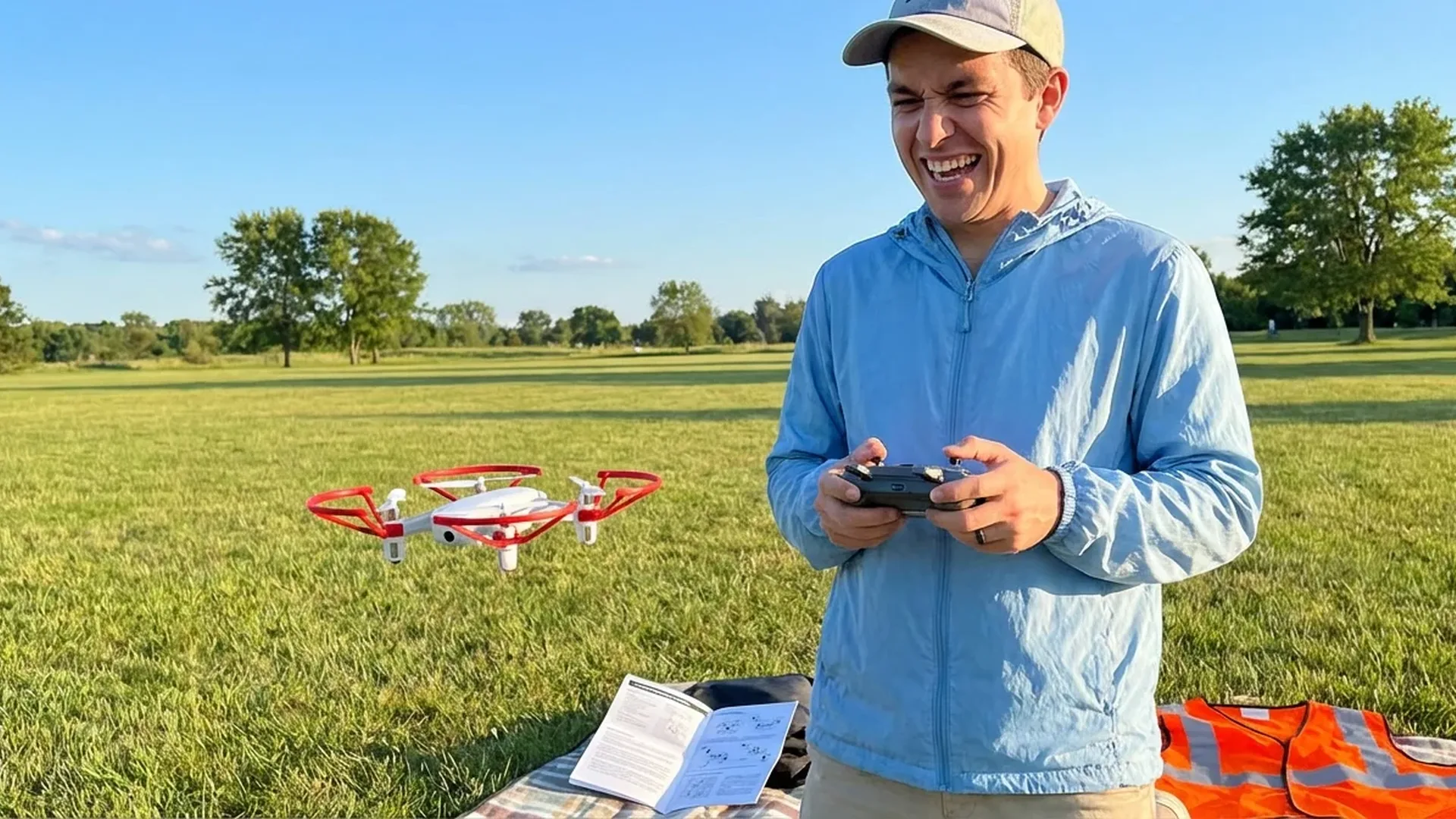
Which Drone Is Right for You?
The consumer drone market is dominated by Chinese manufacturer DJI, which holds roughly 80% of global market share as of 2025. This means most drones you'll find on shelves — physical or digital — carry the DJI logo, and that's no coincidence. Their products win on reliability, software support, and resale value. For a beginner, the safest choice is a drone under 249 grams — because at that weight class, EU regulations don't require exams or certifications.
Let's look at the three best options for 2026:
DJI Flip — The Safest for Beginners
From €400 (~$439)The DJI Flip launched as DJI's first drone with a foldable full-coverage propeller guard — a protective shell made of carbon fiber that weighs just 1/60th of traditional polycarbonate material while maintaining the same rigidity. This means that even if you fly close to walls or trees, the propellers are fully protected. It weighs under 249 grams, features a 1/1.3-inch CMOS sensor, records 4K/60fps HDR video with 10-bit D-Log M, and supports palm takeoff — launching from your palm without a remote controller. Voice control ("Hey Fly"), Subject Tracking, 6 intelligent shooting modes (Dronie, Circle, Rocket, Helix, Boomerang, Spotlight), MasterShots, Hyperlapse, Panorama. 31-minute flight time and DJI O4 video transmission up to 13 km. It features a 3D Infrared Sensing System for automatic braking, even at night.
DJI Mini 4 Pro — The Best Value Overall
From €700 (~$759)If you want the “complete package” in a sub-249-gram body, the DJI Mini 4 Pro is it. 1/1.3-inch sensor, f/1.7 lens, 48MP RAW photos, 4K/60fps HDR, 4K/100fps slow motion — all in a body that fits in your pocket. But the real advantage is obstacle avoidance: omnidirectional obstacle sensing (4 wide-angle + 2 downward vision sensors) with APAS (Advanced Pilot Assistance Systems). The O4 transmission system delivers a 1080p/60fps live feed up to 20 km (FCC) or 10 km in Europe (CE). ActiveTrack 360° in Manual and Auto mode, MasterShots, QuickShots (Dronie, Circle, Helix, Rocket, Boomerang, Asteroid), Hyperlapse, Panorama, Waypoint Flight, Cruise Control, Advanced RTH. Wind resistance up to 10.7 m/s. With the standard battery, it flies for 34 minutes.
Important: The DJI Intelligent Flight Battery Plus (45-minute flight time) for the Mini 4 Pro is not sold in Europe, as it pushes the drone over the 249g limit. In Europe, maximum flight time is 34 minutes with the standard battery.
DJI Mini 3 — The Budget Pick
From €385 (~$419)The DJI Mini 3 is the most affordable entry into the DJI ecosystem under 249 grams. It lacks omnidirectional obstacle sensing — only downward obstacle sensing — and uses the O2 transmission system (10 km range, 720p live feed) instead of O4. However, it shoots satisfactory 4K video, has 38-minute flight time, and gets the job done as a first drone — with one important caveat: you need to be more careful because it can't “see” obstacles ahead, behind, or to the sides.
Quick Comparison
DJI Flip vs Mini 4 Pro vs Mini 3 (2026)
- DJI Flip (~€400 / ~$439): Propeller guard, palm takeoff, 3D Infrared Sensing, 31 min, O4 13 km, voice control
- DJI Mini 4 Pro (~€700 / ~$759): Omnidirectional sensing, APAS, 34 min, O4 20 km (FCC)/10 km (CE), ActiveTrack 360°, Waypoint Flight
- DJI Mini 3 (~€385 / ~$419): Downward sensing only, 38 min, O2 10 km (720p), basic QuickShots
Our recommendation: If safety is your #1 priority and you want palm takeoff, get the Flip. If you want the best possible footage and full obstacle avoidance, get the Mini 4 Pro. If budget is tight, the Mini 3 is reliable but requires more caution.
What's in the Box
Before you rip everything open, it's worth knowing what to expect. Most DJI drones are sold in two editions: the standard version (drone + remote controller) and the Fly More Combo (drone + remote controller + extra batteries + charging hub + carrying bag + propeller guards). For the DJI Mini 4 Pro, the Fly More Combo RC 2 costs ~€1,010 (~$1,099) and includes 3 batteries, a charging hub, carrying bag, and the DJI RC 2 remote controller with a built-in 5.5-inch screen (1080p, 700 nits brightness).
The DJI Flip is an exception — it supports flying without a remote controller via Wi-Fi Direct connection to your smartphone and the DJI Fly app. You can even control it with just your voice ("Hey Fly") in English or Mandarin. Of course, if you want greater range and more precise control, a remote controller is recommended.
Tip: If you plan to fly regularly, the Fly More Combo is worth every penny. One battery gives you 30-38 minutes of flight time — which in practice becomes 25-30 minutes. Three batteries mean over an hour of actual flying, enough time to learn the basics.
Pre-Flight Checklist
You bought the drone. You opened the box. The battery is charged. Now what? Before you hit “takeoff,” follow this step-by-step checklist:
Pre-Flight Checklist
- Download the DJI Fly app and update the firmware — never fly with outdated firmware
- Fully charge both the drone battery and the remote controller
- Insert a microSD card (V30/U3 class or better) — internal storage fills up fast
- Inspect the propellers — if they're cracked or bent, replace them immediately
- Find an open area free of trees, power lines, or buildings within at least 30 meters
- Check the weather — avoid wind above 5 m/s and rain. Consumer drones are not waterproof
- Check the DJI Fly Safe map for Geo Zones — don't fly near airports or restricted areas
- Set your Return-to-Home (RTH) altitude — at least 30-50 meters above the tallest obstacles in the area
- Run compass calibration if the app requests it — follow the instructions precisely
- Check GPS connection — wait until it locks onto at least 12+ satellites before takeoff
Your First Flight: Step by Step
The moment you hit takeoff and watch your drone lift into the air is magical — but it can also be a little frightening. Follow these steps for a smooth first experience:
Step 1: Hover at 2 Meters
After takeoff, leave the sticks centered. The drone will hover steadily at ~1.2 meters. Slowly raise it to 2 meters. Watch how it behaves: if it drifts on its own (due to wind or poor GPS lock), you may need to land and recalibrate.
Step 2: Basic Movements
Practice the 4 fundamentals: forward/backward, left/right (right stick), up/down, yaw left/right (left stick). Don't push the sticks to the max — start with gentle, gradual movements. Cine mode (reduced speed) is ideal for beginners.
Step 3: Practice the Figure-8
Once you feel comfortable with basic movements, trace an invisible figure-8 in the air using both sticks simultaneously. This exercise improves hand coordination and teaches you how banking movements feel. Maintain a steady altitude of 5-10 meters — don't fly too high at first.
Step 4: Test Return-to-Home
Before you need it in an emergency, test the RTH (Return-to-Home) function intentionally. Press the RTH button on the remote controller or in the app. The drone will climb to your set RTH altitude, turn toward the takeoff point, fly back, and land automatically (Advanced RTH on the Mini 4 Pro and Flip). You know it works — now you feel more confident.
Pro Tip: Always look at the actual sky, not just the screen. The DJI Fly app shows a live feed, but peripheral awareness (situational awareness) is critical — especially for birds, power lines, and aircraft.
The 8 Most Common Beginner Mistakes
About 90% of drone accidents happen due to human error, not equipment failure. Let's look at the classics:
Flying on low battery. Many beginners fly until the drone drops. Battery depletes faster in headwind or cold temperatures. Always land with at least 20-25% battery remaining — this means if the drone shows 30%, it's already time to head back.
Flying in enclosed/tight spaces. Consumer drones aren't designed for indoor flight. Without GPS signal, they rely solely on vision sensors — which may not recognize glass, thin wires, or dark surfaces. Always fly in open areas for your first few weeks.
Ignoring wind. Drones under 249g are significantly affected by wind. The DJI Mini 4 Pro handles up to 10.7 m/s (Level 5 wind resistance) — but that means in strong gusts, it may need full power just to hold position, draining the battery 2-3 times faster. If you see trees swaying hard, don't fly.
Flying too far without experience. O4 transmission promises 10-20 km — but that doesn't mean you should go there. Start with flights within 100-200 meters visual line of sight. You can explore greater distances much later.
Skipping firmware updates. Every DJI firmware update brings improvements to obstacle avoidance, flight stability, battery management, and new features. Flying on old firmware means missing critical safety patches.
Taking off without GPS lock. If you take off before GPS locks on (ideally 12+ satellites), the Return-to-Home function won't know where to return. This means that if you lose signal, the drone might simply hover until the battery dies — or worse, fly in a random direction.
Panicking during low battery or signal loss. If the screen shows “low battery” or “signal lost,” don't panic. The drone will automatically activate RTH. If you have signal, calmly press RTH. If you randomly jerk the sticks in panic, you might cancel the automatic RTH and make things worse.
Flying without checking Geo Zones. DJI uses a GEO Zones system that prevents flights near airports, military bases, and other restricted areas. If you don't check before arriving at your flying location, you might discover you can't even take off. Use the map in DJI Fly or at fly-safe.dji.com.
EU Regulations: What You Need to Know
The European Union enforces a unified drone regulation framework through EASA (European Union Aviation Safety Agency). The regulation categorizes drones based on weight and type of operation. For drones under 250 grams — like the DJI Flip, Mini 4 Pro, and Mini 3 — simplified rules apply:
Rules for Drones <250g (Open Category A1)
- No exam or pilot certification required (for private use)
- Maximum flight altitude: 120 meters above ground level (AGL)
- Visual Line of Sight (VLOS): You must always be able to see the drone with the naked eye
- Flying is prohibited over crowds, near airports (without authorization), and in restricted zones
- Operator registration: In many EU countries (including Greece), registration with the civil aviation authority is required even for drones <250g if they have a camera
- Remote ID: The EU is gradually implementing Remote ID requirements — check if your drone supports a Class Identification Label (C0 for <250g)
Before you fly, check the DJI Fly Safe map or local NOTAMs (Notices to Airmen) for your area. During holiday seasons or near archaeological sites, additional restrictions may apply.
"Drone classification by weight has particular significance in the EU: drones under 250 grams fall under EASA's A1 Open Category, with significantly simplified operational rules." — European Commission, Regulation (EU) 2019/945
Accessories Worth Having
A drone without the right accessories is like a DSLR without a lens. Some are essential, others make your life easier:
MicroSD Card
V30/U3 minimum, 128GB+. Samsung EVO Plus or SanDisk Extreme Pro are proven choices. 4K/60fps HDR fills up memory fast.
Extra Batteries
At least 2-3 total. The Fly More Combo includes 3 batteries + charging hub — the most cost-effective solution.
Carrying Case
Hard case or soft bag. Protects the sensor, propellers, and gimbal during transport — especially when traveling.
ND Filters
ND16/ND64/ND256 — reduce light for cinematic motion blur. Essential in sunny conditions for proper shutter speed.
Extra Propellers
Cost just a few euros but save flights. A small bump can crack a propeller — and you never fly with cracked props. Ever.
Landing Pad
Portable takeoff/landing pad. Protects sensors from dust, gravel, and grass — especially outdoors.
Battery Care & Best Practices
The LiPo (Lithium Polymer) battery is the “heart” of your drone — and it needs care. Modern DJI drones use intelligent batteries with built-in management circuits, but some basic rules still apply:
LiPo Battery Rules
- Don't store fully charged: If you're not planning to fly for 3+ days, DJI batteries automatically discharge to ~60% (storage mode)
- Don't fly in temperatures <5°C without prewarming the battery — keep it in your pocket before inserting
- Charge at room temperature (15-40°C) — never immediately after flying while the battery is still hot
- Avoid flying to 0% — deep discharge dramatically reduces battery lifespan. Land at 20-25%
- Regularly check charge cycles via the DJI Fly app — after 200-300 cycles, capacity drops noticeably
First Shots: Where to Start
Now that you're flying steadily, it's time to capture impressive footage. Modern drones offer automated modes that make the job easier:
QuickShots — Cinematic Footage With One Tap
QuickShots are pre-programmed flight paths that create impressive footage automatically. The most popular modes include: Dronie (flies backward and upward, revealing the landscape), Circle (circular flight around the subject), Helix (spiral ascent around you), Rocket (vertical launch with camera pointing down), and Boomerang (elliptical orbit). The DJI Mini 4 Pro also offers Asteroid — a striking “tiny planet” shot. Everything happens automatically: you simply select the subject on screen.
MasterShots — Automatic Cinematic Video
Before learning manual techniques, try MasterShots. Both the DJI Flip and Mini 4 Pro automatically execute a series of cinematic maneuvers, film multiple clips, edit them with music, cuts, and effects, and deliver a ready-to-share video in seconds. Perfect for social media.
Hyperlapse — Timelapses From Above
The Hyperlapse function creates timelapse videos while the drone moves (Free, Circle, Course Lock, or Waypoint). Imagine a sunset over a city in fast-forward, with the drone slowly orbiting around you. This is why you need a drone — such shots are impossible without one.
Video Settings for Beginners: Start with 4K/30fps, Normal color profile, Auto exposure. Once you feel more comfortable, try 4K/60fps HDR for smoother footage. Advanced modes (D-Log M, 10-bit, manual exposure) are excellent but require color grading in post — something you can learn later.
DJI Care Refresh: Worth It?
DJI offers the DJI Care Refresh insurance program, a type of warranty that covers breakage, water damage, and even flyaway (drone loss). With an annual subscription, you can replace a damaged drone by paying a small excess fee. For beginners, who statistically make more mistakes in their first month, this service can literally save hundreds of euros. The price depends on the model — but compared to the cost of a new drone, it's almost always the right call.
Next Steps
After your first 10-20 flights, you'll feel comfortable enough to explore more advanced techniques:
- ActiveTrack / Subject Tracking: Have the drone automatically follow you while walking, running, or cycling
- Waypoint Flight (Mini 4 Pro): Program precise flight paths with checkpoints — ideal for repeatable shots
- Manual Camera Settings: Control ISO, shutter speed, white balance — cinematographers prefer shutter speed double the frame rate (e.g., 1/60 for 30fps)
- D-Log M / 10-bit: Try flat color profiles for maximum dynamic range — requires color grading in DaVinci Resolve or Premiere Pro
- Panorama & Sphere: Create 360° aerial photos or stunning wide-angle panoramic landscapes
"DJI holds 80% of the global consumer drone market in 2025, with no competitor exceeding 5%. This dominance is built on the combination of affordable pricing, reliability, user-friendly software, and pioneering safety features." — Source: Drone Industry Insights, Oliver/Telegraph, 2025
Summary: Start Right
Buying your first drone is an exciting experience — but proper preparation makes the difference between a wonderful first flight and a drone stuck in a tree. The key takeaways:
With a drone under 249 grams — whether it's the DJI Flip (~€400 / ~$439), the Mini 4 Pro (~€700 / ~$759), or the Mini 3 (~€385 / ~$419) — you have in your hands a flying camera capable of cinematic shots that just a few years ago required thousands of euros worth of equipment. The technology is here. The possibilities are incredible. All you need is to take the first steps correctly — and this guide hopes to help you do exactly that. Happy flying!